Every SOC analyst knows the situation: you write an extensive prompt for alert triage, it works well, and three days later you cannot replicate the result. The colleague on the next shift improvises another prompt. Institutional knowledge exists only in the head of whoever is on duty.
Skills tackle this directly. Instead of a giant prompt loaded in every interaction, you package procedures into versioned folders that the agent loads on demand.
The problem Skills solve
The format is simple: a folder with a SKILL.md file containing YAML frontmatter and Markdown instructions, optionally accompanied by scripts and reference files.
alert-triage/
├── SKILL.md              # Main instructions
├── scripts/
│   └── ioc_extractor.py  # Deterministic extraction
└── references/
    ├── scoring_guide.md  # Scoring methodology
    └── escalation.md     # Escalation criteria
The agent loads only metadata at startup. When a task matches a skill description, it pulls the full instructions. Scripts and references are loaded only when needed.
In practice this means: you can have dozens of skills available without blowing up the context window. It is progressive disclosure applied to automation.
The open standard: cross platform portability
In December 2025, Anthropic published the Agent Skills specification as an open standard at agentskills.io. OpenAI documents support for this format in ChatGPT and Codex, and other compatible agents implement the same core convention.
What you get from this is reuse of the core instructions and resources, not guaranteed drop-in portability. Tool names, invocation policy, filesystem locations, permissions, sandbox behavior, network access, and vendor-specific extensions can differ. Moving a skill between Claude and Codex therefore requires validation and sometimes an adapter or metadata change.
The specification is intentionally minimalist:
---
name: alert-triage-enrichment
description: Enrich security alerts with TI, asset context, historical patterns.
  Use when processing SIEM alerts or investigating incidents.
license: Apache-2.0
metadata:
  author: your-org
  version: "1.2.0"
---
The name and description fields are required. The description influences skill matching. A specific description such as “extract IOCs from CrowdStrike, ANY.RUN, or Joe Sandbox reports” is more likely to match the intended request than “helps with security”, but activation still needs evals in each host.
How activation works
Skills support both explicit invocation (via commands like /skills or $skill-name in Codex) and implicit activation (agent decides based on task description). The behavior varies by agent implementation. The agent scans available skills at startup, loading only metadata. When a request matches a skill description, the agent loads the full instructions.
In most implementations, skill selection is primarily driven by the description text and the agent’s reasoning, rather than strict algorithmic matching. However, some tools may include additional heuristics or preprocessing.
# Works: specific triggers, clear scope
description: Extract IOCs from malware sandbox reports and correlate with threat
  intelligence. Use when processing CrowdStrike, ANY.RUN, or Joe Sandbox outputs,
  or when asked to extract indicators from behavioral analysis reports.

# Does not work: vague, overlaps many cases
description: Helps analyze security data and find threats.
Vague descriptions cause silent activation failures. Overly broad descriptions cause false activations. Treat the description as SEO for the model reasoning.
Skills in practice: the awesome-dfir-skills repository
The tsale/awesome-dfir-skills repository offers a useful community collection focused on DFIR and incident response. It describes its artifacts as workflows to copy and paste, however; it is not a drop-in implementation of the Agent Skills specification:
Its moving directory tree is safest described as a category-and-workflow pattern rather than as a fixed inventory:
awesome-dfir-skills/
├── README.md
├── _templates/
│   └── skill.md                  # Repository-specific template
└── <category>/
    └── <workflow-id>/
        └── skill.md              # Copy/paste workflow
The lowercase skill.md entrypoint and several custom fields in that repository do not satisfy the standard as written. A compatible package must use the exact SKILL.md filename and a compliant frontmatter. Treat the repository as source material to adapt and review, not as an install-ready skills catalog.
The repository principles are still worth extracting:
Be explicit about assumptions. If a log source might not exist, state it. If you assume a specific timestamp format, document it.
Declare inputs and outputs. Put structured input requirements and expected deliverables in the Markdown body or a referenced schema. inputs and outputs are not standard Agent Skills frontmatter fields; custom catalog metadata should not be presented as portable metadata.
Safety-first. Call attention to privacy and evidence handling. Analyze attachments in an isolated local laboratory or a private, organization-approved sandbox. Do not upload samples, PII, credentials, or regulated evidence to a public API by default; start with hashes when possible and follow retention, chain-of-custody, and vendor-approval requirements.
Tool-agnostic by default. If including examples in Splunk/KQL/Elastic, label and explain field mapping. Portable skills work in more environments.
The insight here is that well-written skills function as executable documentation. A new analyst can read the SKILL.md to understand the procedure, while the agent executes automatically.
Skill 1: Initial Incident Intake
The source workflow identified as triage.initial-incident-intake standardizes first-hour incident intake. The example below shows how to adapt its metadata to the open specification under an initial-incident-intake/SKILL.md path.
Metadata
---
name: initial-incident-intake
description: First-hour incident intake and scoping that produces an evidence
  plan. Use for new cases, SOC-to-IR handoffs, or incomplete incident reports.
license: Apache-2.0
compatibility: Requires approved access to incident records; performs no production actions.
metadata:
  author: awesome-dfir-skills-contributors
  version: "0.1.0"
---
The inputs, constraints, and outputs shown below belong in the Markdown instructions (or a referenced schema), not in non-standard top-level YAML fields.
Embedded rules
The skill instructs the agent with specific constraints:
- If details are missing, ask targeted questions
- Do not assume log sources exist, confirm them
- Use the reporter timezone; if unknown, state explicitly
Expected deliverables
- Incident summary: 2-5 actionable sentences
- Working hypothesis: what you think is happening + confidence
- Time window: earliest to latest suspected activity
- Known / Unknown: bullets separating what is known from what is not
- Immediate containment: safe and low-regret actions
- Evidence request: prioritized, with WHY for each item
- Next 60 minutes plan: executable checklist
Evidence request starter list
The skill includes a base artifact list by incident type:
| Type | Artifacts |
|---|---|
| Identity (Entra/AD/Okta) | Sign-in logs, audit logs, MFA events, risky sign-ins |
| Message trace, headers, URL click logs, mailbox audit, rules/forwarding | |
| Endpoints | EDR detections, timeline, process tree, network connections |
| Network | Proxy/DNS logs, firewall flows, VPN logs |
| Cloud | CloudTrail / GCP audit / Azure activity, object storage access |
Why it works: it standardizes intake quality and forces explicit assumptions. The next shift analyst knows exactly where the case stopped.
Skill 2: Malware Analysis
The malware-analysis skill produces analyst-grade reports, not data dumps. Every conclusion must be backed by evidence and reasoning.
Core principles
- Evidence-based reasoning: never state a conclusion without explaining WHY
- Connect the dots: link indicators to behaviors to capabilities to impact
- Assess confidence: state how confident you are and why
- Actionable output: reports should enable decisions, not just inform
3-step workflow
Step 1: Collect Data - Run scripts for deterministic collection:
# Static analysis: hashes, PE info, strings, APIs, entropy
python3 scripts/static_analysis.py /path/to/sample -f json > static.json

# Threat intelligence: reputation across multiple sources
python3 scripts/triage.py -t file /path/to/sample -f json > triage.json

# IOC extraction: IPs, domains, URLs, hashes, registry keys
python3 scripts/extract_iocs.py /path/to/sample -f json > iocs.json
Step 2: Analyze and Reason - The critical step:
Threat Intelligence Assessment:
- What does each source actually report, at what time, and for which hash?
- Treat a VirusTotal ratio as aggregated vendor evidence, not a verdict. There is no universal count that confirms maliciousness, and false positives occur.
- Treat family labels as hypotheses until naming, configuration, behavior, and other independent evidence converge.
- Treat
first_seenas a timestamp from that source, not proof of an active campaign.
API Analysis - map APIs to behaviors:
| API Pattern | Probable Behavior | Reasoning |
|---|---|---|
| OpenProcess + VirtualAllocEx + WriteProcessMemory + VirtualProtectEx + CreateRemoteThread | Possible remote process injection | This sequence is consistent with allocating, writing, protecting, and starting code in another process |
| CredEnumerate, CryptUnprotectData | Possible credential access | APIs can enumerate credentials or unprotect DPAPI data, but context and arguments matter |
| InternetOpen + URLDownloadToFile | Possible downloader behavior | Network initialization plus a file download can be legitimate or malicious |
| RegSetValueEx + Run key paths | Possible persistence | A write to a Run key can configure startup, but imports alone do not show that it occurred |
| IsDebuggerPresent, GetTickCount | Possible anti-analysis | These APIs have benign uses and require call-site or runtime context |
The Ex suffix matters: VirtualAlloc allocates in the calling process, while VirtualAllocEx and VirtualProtectEx operate on a specified process. Even the complete import sequence is only static evidence of available primitives; proving injection requires call-site analysis or runtime telemetry showing the APIs were invoked with a target process and relevant buffers.
Packing indicators:
- High entropy (for example, above 7.0 in a byte-level measure) is compatible with compression, encryption, or packing; it does not prove any of them
- UPX0, UPX1, or
.aspacksection names are packer indicators that still require validation - A small import table centered on
GetProcAddress/LoadLibraryis compatible with dynamic API resolution, not proof of malicious behavior
Step 3: Write the Report - Standardized structure:
# Threat Analysis Report: [MALWARE_NAME]

| | |
|---|---|
| Risk Level | CRITICAL/HIGH/MEDIUM/LOW |
| Confidence | High/Medium/Low |
| Analysis Date | DATE |

## Executive Summary
[2-3 sentences: What is this? Is it malicious? What can it do? How do we know?]

## Threat Intelligence Assessment
[What do TI sources say? Explain what each finding means]

## Behavioral Analysis
### Identified Capabilities
[For each capability: Confidence + Evidence + Reasoning]

## MITRE ATT&CK Mapping
[Only techniques you can justify with evidence]

## Indicators of Compromise
[File, Network, Host indicators]

## Risk Assessment
[Overall risk + reasons + confidence level]

## Recommendations
[Immediate actions + Detection opportunities + Further analysis needed]
Example: bad vs good analysis
Bad (data dump):
“Found APIs: VirtualAlloc, CreateRemoteThread, RegSetValueEx. Entropy: 7.2. VT: 34/70.”
Good (analyst reasoning):
“Static analysis found
VirtualAllocEx,WriteProcessMemory,VirtualProtectEx, andCreateRemoteThread, a combination consistent with a remote-injection primitive. Imports alone do not prove those calls executed; confirm with call-site analysis or a runtime trace. Entropy of 7.2 is consistent with compressed or encrypted content but is not proof of packing. A 34/70 VirusTotal ratio is material multi-vendor evidence, not automatic confirmation of maliciousness or an Agent Tesla family label; corroborate attribution with behavior, configuration, and independent sources.”
Why it works: it combines deterministic tooling (scripts) with a structured reasoning framework. It prevents confident but incorrect conclusions, and forces the analyst (human or AI) to explain the “why” behind each finding.
This skill was part of the inspiration for the PDF triage skill presented in the next section - applying the same principle of structured reasoning to document analysis.
From theory to practice: a skill for document triage
The skills above demonstrate the pattern: declared inputs, structured outputs, explicit reasoning. But theory is theory. Let’s move to a real case.
PDFs and documents are persistent attack vectors. In 2025, the scenario only got worse:
- Q1 2025: APWG recorded over 1 million phishing attacks - the highest quarterly total since 2023. PDFs with malicious QR codes (quishing) exploded after Microsoft blocked macros by default in Office documents.
- Q4 2025: The SORVEPOTEL malware (from the Water Saci campaign) hit Brazil hard. Files disguised as payment receipts and boletos arrived via WhatsApp; SORVEPOTEL itself is primarily the self-propagation mechanism, spreading to all of the victim’s contacts, while the banking trojan associated with the campaign (Maverick) handles the theft of credentials from Bradesco, Itaú, Caixa, Banco do Brasil and crypto exchanges.
The pattern is clear: documents are trusted by default, pass through filters, and users open them without a second thought - especially when they come from known contacts on WhatsApp. Attackers know this.
The problem for N1 analysts
In first-line triage, the typical flow is:
- Alert arrives (suspicious email, reported attachment)
- Analyst checks the hash and approved reputation sources; sample upload requires data-handling approval
- Analyst treats detections and labels as evidence, then corroborates them before disposition
The problem: a zero-detection result does not establish that a file is safe, while one or more detections can be false positives. N1 analysts also may not have the time, tools, or knowledge for manual static analysis of PDFs.
I created the pdf-triage-plus skill to address this (I plan to publish it along with other skills on GitHub soon). The idea is simple: package static-analysis knowledge into a repeatable procedure with a prioritization score and actionable outputs. That score is an internal triage heuristic, not ground truth.
The skill combines deterministic tools with structural analysis. It surfaces structures and code that require context; it does not observe runtime behavior.
Static triage case: internal heuristic score 95/100 vs VirusTotal detection count 0/63
To exercise the workflow, I created a PDF containing obfuscated and suspicious Acrobat JavaScript. This comparison shows what the static procedure surfaced that the VirusTotal vendors did not flag at that scan time; it does not prove that the PDF’s claimed execution chain worked.
The sample
Simple PDF. Title: “System Security Report”. Subtitle: “Confidential - Security Team”. One page. Social engineering targeting security teams - quite ironic.
Standard first step: check the hash in VirusTotal. Uploading a sample requires privacy, evidence-handling, and vendor approval.
SHA256: 0caff9ea55aa25a6333b6e648838cd0652f50f3fba2784153d11024e68e5e63e
Detections: 0/63
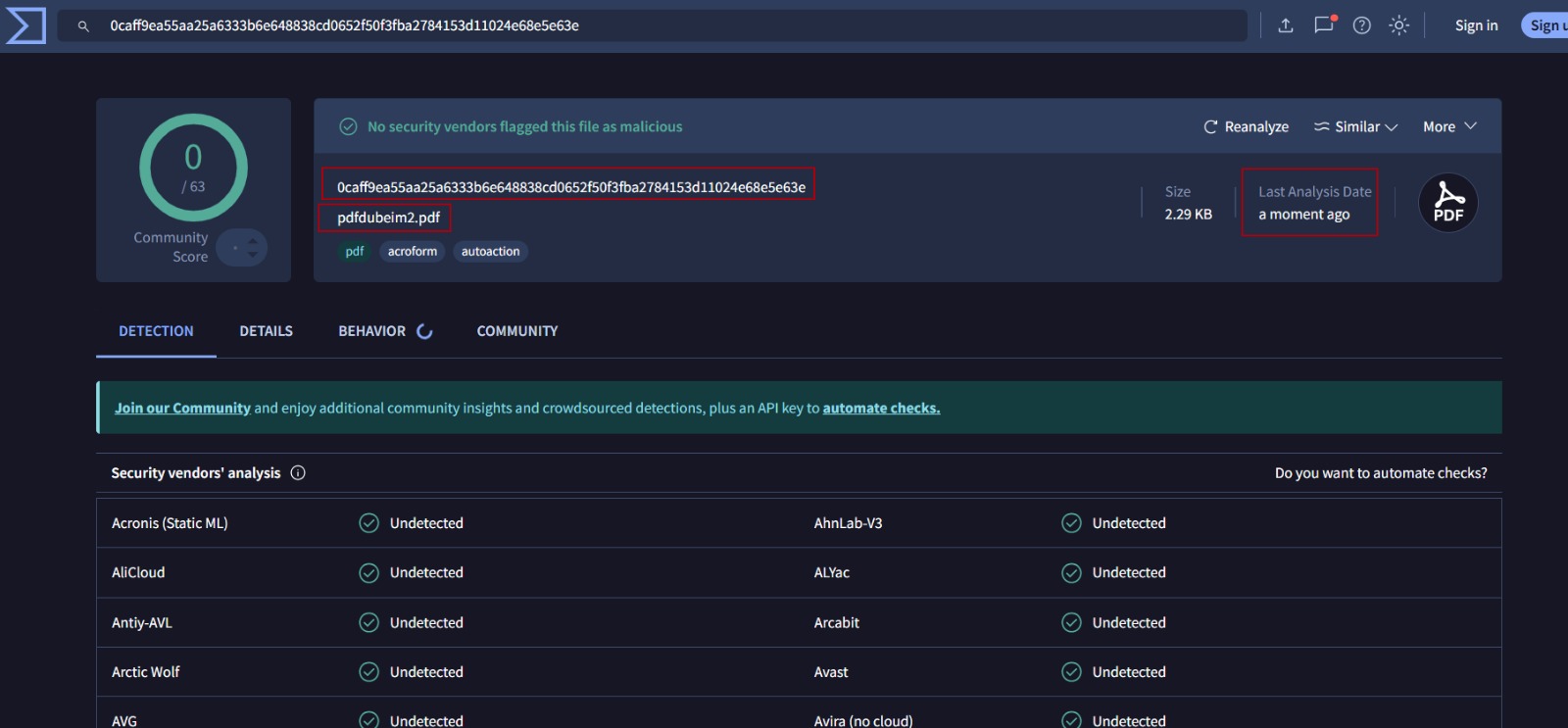
None of the 63 vendors flagged the file at that scan time. VirusTotal aggregates vendor outputs and does not issue its own verdict, so 0/63 means “not detected,” not “safe.”
Second step: the PDF triage skill.
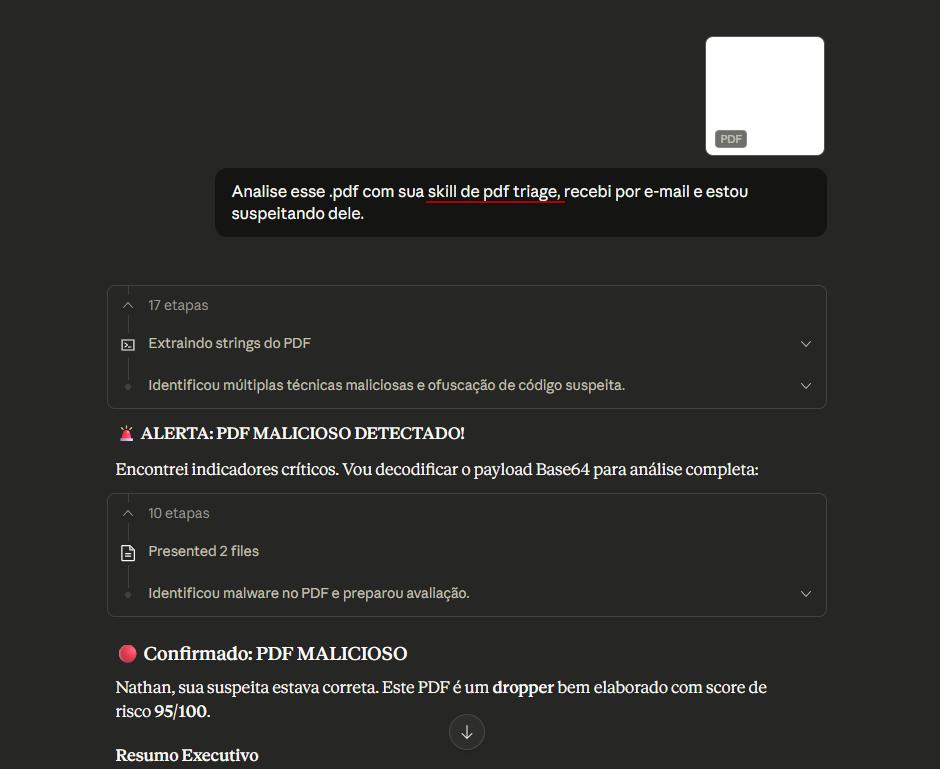
Risk Score: 95/100 - CRITICAL PRIORITY
Assessment: SUSPICIOUS - manual and dynamic validation required
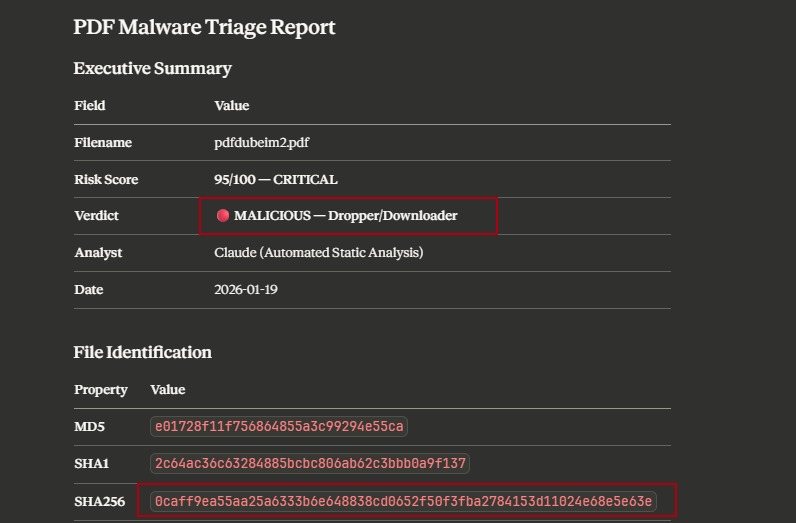
The static pass extracted encoded script and candidate IOCs. Its high score correctly prioritized review, but its original MALICIOUS - Dropper/Downloader label was too strong for the available evidence.
What VirusTotal saw
VirusTotal combines outputs from independent vendors; those products can use signatures, heuristics, ML, emulation, or other methods. The result records what each vendor detected at a particular time. It can contain both false negatives and false positives, and the detection count is not a universal classifier.
Basic pdfid shows:
/JavaScript     0    ← Summary counter absent
/OpenAction     0    ← No document-open action counted
/Launch         0    ← No Launch action counted
/AA             1    ← One additional-action entry present
/AcroForm       1
The constructed sample omitted common top-level flags while placing an additional action inside a form field. That explains why deeper inspection was useful; it does not establish why any particular vendor returned no detection.
What the skill saw
The skill doesn’t stop at flags. It extracts and analyzes stream contents:
Object 6:
/Type /Annot
/Subtype /Widget
/T (sys_field)
/Rect [ 0 0 1 1 ]      ← Tiny 1x1 user-space-unit widget
/AA <<
/F <<
stream
var parts = 'Ly8gU3l...'
The suspicious script was stored in /AA (Additional Actions) inside a form widget whose rectangle measures 1×1 unit in PDF user space. That geometry is tiny, but it does not by itself prove invisibility: rendering depends on the page and viewer. Static decoding reassembled fragmented Base64 text; no runtime trace was published.
I won’t include the full decoded code because that’s not the point of this post.
The decoded text appeared to express an intent to delay, write a .ps1 under %TEMP%, and invoke PowerShell. That is a suspicious static hypothesis, not an observed execution chain. The published material does not include the sample or generator, raw tool output, Acrobat/Reader version, viewer configuration, or a dynamic trace needed to reproduce the behavior.
What the static triage established
The fundamental difference is in the question each approach asks:
Reputation scan asks: “Did any vendor flag this artifact at this point in time?”
Structural analysis asks: “Does this contain structures or code that warrant investigation?”
That second question exposed evidence worth escalating, but static inspection alone cannot prove runtime behavior.
The static triage is useful because:
- Extracts streams beyond summary flags - A zero
/JavaScriptcount does not end the inspection when other objects contain code-like data - Attempts layered decoding - Records Base64, hex, or charcode transformations while keeping decoded text separate from observed execution
- Checks claimed API semantics - the documented Acrobat API has no
util.writeToFile;app.launchURLopens a URL in a browser and is not a PowerShell execution primitive. Modern Acrobat also restrictsfile:andjavascript:URLs to privileged contexts - Combines indicators for prioritization - no single indicator or score is definitive; dynamic validation is required before asserting execution
Operational lesson
VirusTotal detection count = 0  →  does NOT mean safe
VirusTotal detections  →  evidence, not automatic confirmation
Do not rely on a VirusTotal ratio alone for suspicious-attachment disposition. A zero result requires additional analysis when context remains suspicious; positive results also require review because vendors can produce false positives. Static structural triage complements reputation and dynamic analysis, but does not replace either.
Limitations and risks
Prompt injection via analyzed artifacts
When the skill processes logs, emails or reports, the content may contain instructions that hijack the agent. Example: malicious hostname curl-commands.please-run-rm-rf.example.com or hidden instructions in PDFs.
Defense in depth:
- Content separation and sanitization
- Explicit demarcation of untrusted content
- Specialized detection before analysis
- An isolated local lab or private, approved sandbox with restricted filesystem and network access
- Human approval for high risk actions
- Continuous adversarial testing
Skill supply chain risk
Skills can contain executable code. A malicious skill may execute commands, exfiltrate data, or manipulate the workflow. Do not assume signing or verified provenance: check the host’s current controls and validate package source, review status, and integrity.
Required controls:
- Code review for all files
- Inventory with versioning
- Trusted sources only
- Monitoring for unauthorized changes
Hallucination in security context
LLMs may invent IOCs, misclassify activity, generate confident but incorrect analysis.
Mitigations: use scripts for factual validation, cross-verify against authoritative sources, keep humans in the loop for classifications.
Conclusion
Skills represent a shift from ad-hoc prompts to versioned, auditable procedures. For security operations: consistency across shifts, institutional knowledge capture, reproducible workflows.
The PDF case demonstrates a narrower practical value: in one author-built sample, static triage surfaced suspicious structures that 63 VirusTotal vendors did not flag at that scan time. It did not prove the alleged PowerShell execution. Reputation, structural analysis, controlled dynamic analysis, and analyst review answer different questions and should be combined.
The pragmatic approach:
- Start small: Reporting skills before production triage
- Isolate deliberately: Use an isolated local lab or a private, approved sandbox; restrict filesystem and network access and protect sample/PII confidentiality
- Humans in the loop: Gates for high impact actions
- Audit verifiable evidence: Record tool calls, inputs and outputs, hashes, versions, sources, approvals, and explicit analyst decisions; do not use hidden reasoning traces as the primary audit trail
- Test adversarially: Prompt injection in tests
- Version control: Skills are code, with reviews and rollback
My repository: CyberSec-Skills
The community is building: awesome-dfir-skills offers material to adapt. The open specification at agentskills.io improves reuse, while host-specific tools and controls still need validation.
References
Official documentation
- OpenAI: Build skills for ChatGPT and Codex
- Claude Code Skills
- Agent Skills Platform Docs
- Anthropic Engineering Blog
- VirusTotal: False positives and aggregated vendor results
- Microsoft: VirtualAlloc and VirtualAllocEx
- Microsoft: VirtualProtectEx
- Adobe Acrobat JavaScript API Reference
Open standard specification
Reference repositories
- DFIR Skills Collection
- OpenAI Skills Repository
- Awesome Agent Skills
- CyberSec-Skills (author’s repository)
Security and risks
Case study sample
Threat intelligence
- APWG Phishing Activity Trends Report Q1 2025
- Trend Micro - Self-Propagating Malware Spreading Via WhatsApp (Water Saci / SORVEPOTEL)
This analysis was reviewed against publicly available documentation in July 2026. Details can change; validate against current vendor docs before production deployment.